


MD-102 Practice Test Questions Answers Updated 245 Questions
MD-102 dumps & Microsoft 365 Certified Sure Practice with 245 Questions
NEW QUESTION # 143
Your company has devices enrolled in Microsoft Intune as shown in the following table.
In Microsoft Endpoint Manager, you define the company's network as a location named Location1.
Which devices can use network location-based compliance policies?
- A. Device1, Device2, and Device3
- B. Device1 and Device2 only
- C. Device2 and Device3 only
- D. Device2 only
- E. Device1 only
Answer: A
Explanation:
Explanation
Intune supported operating systems
Intune supports devices running the following operating systems (OS):
iOS
Android
Windows
macOS
Note: View the device compliance settings for the different device platforms:
Android device administrator
Android Enterprise
iOS
macOS
Windows Holographic for Business
Windows 8.1 and later
Windows 10/11
Reference: https://docs.microsoft.com/en-us/mem/intune/fundamentals/supported-devices-browsers
https://docs.microsoft.com/en-us/mem/intune/protect/device-compliance-get-started
NEW QUESTION # 144
You have a Microsoft 365 subscription that contains 500 Android Enterprise devices.
All the devices are enrolled in Microsoft Intune.
You need to deliver bookmarks to the Chrome browser on the devices
What should you create?
- A. an app configuration policy
- B. a compliance policy
- C. a configuration profile
- D. an app protection policy
Answer: D
NEW QUESTION # 145
You have a Microsoft 365 E5 subscription that contains 10 Android Enterprise devices. Each device has a corporate-owned work profile and is enrolled in Microsoft Intune.
You need to configure the devices to run a single app in kiosk mode.
Which Configuration settings should you modify in the device restrictions profile?
- A. System security
- B. Users and Accounts
- C. General
- D. Device experience
Answer: D
Explanation:
Explanation
To configure the devices to run a single app in kiosk mode, you need to modify the Device experience settings in the device restrictions profile. You can specify the app package name and activity name for the app that you want to run in kiosk mode. References:
https://docs.microsoft.com/en-us/mem/intune/configuration/device-restrictions-android-for-work#device-experie
NEW QUESTION # 146
You have 100 computers that run Windows 10.
You plan to deploy Windows 11 to the computers by performing a wipe and load installation.
You need to recommend a method to retain the user settings and the user data.
Which three actions should you recommend be performed in sequence? To answer, move the appropriate actions from the list of actions to the answer area and arrange them in the correct order.
Answer:
Explanation:
Explanation
NEW QUESTION # 147
You have an Azure Active Directory Premium Plan 2 subscription that contains the users shown in the following table.
You purchase the devices shown in the following table.
You configure automatic mobile device management (MDM) and mobile application management (MAM) enrollment by using the following settings:
* MDM user scope: Group1
* MAM user scope: Group2
For each of the following statements, select Yes if the statement is true. Otherwise, select No. NOTE: Each correct selection is worth one point.
Answer:
Explanation:
Explanation
NEW QUESTION # 148
You have a Microsoft 365 E5 subscription that contains a user named User1.
You need to perform the following tasks for User1:
Set the Usage location to Canada.
Configure the Phone and Email authentication contact info for self-service password reset (SSPR).
Which two settings should you configure in the Azure Active Directory admin center? To answer, select the appropriate settings in the answer area.
NOTE: Each correct selection is worth one point.
Answer:
Explanation: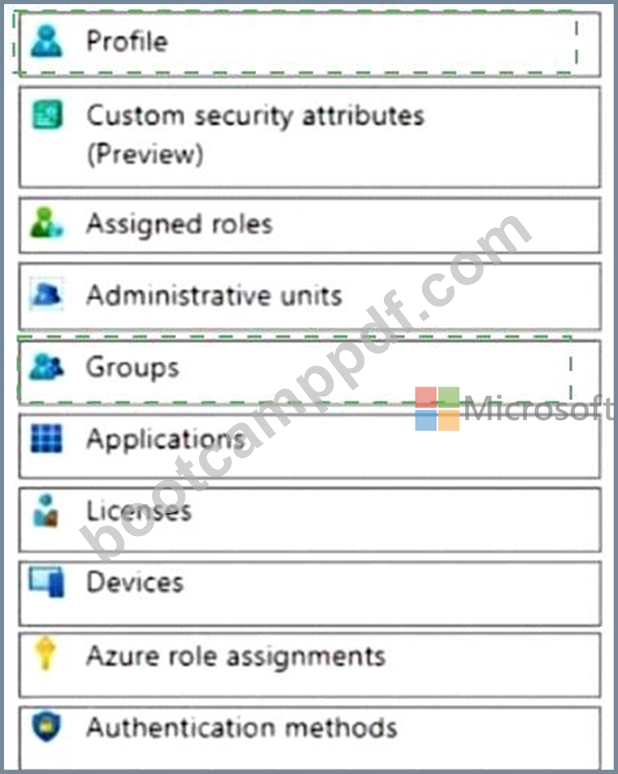
Explanation:
Graphical user interface, application Description automatically generated
NEW QUESTION # 149
You have a Microsoft 365 ES subscription that uses Microsoft Intune.
You have the apps shown in the following exhibit.

Answer:
Explanation:
Explanation
NEW QUESTION # 150
Your company uses Microsoft Defender for Endpoint Microsoft Defender for Endpoint includes the device groups shown in the following table.
You onboard a computer to Microsoft Defender for Endpoint as shown in the following exhibit.
What is the effect of the Microsoft Defender for Endpoint configuration? To answer, select the appropriate options in the answer area.
NOTE: Each correct selection is worth one point.
Answer:
Explanation:
NEW QUESTION # 151
You have devices enrolled in Microsoft Intune as shown in the following table.
Intune includes the device compliance policies shown in the following table.
The device compliance policies have the assignments shown in the following table.
For each of the following statements, select Yes if the statement is true. Otherwise, select No. NOTE: Each correct selection is worth one point.
Answer:
Explanation:
Explanation
Device1 is marked as compliant = No Device2 is marked as compliant = Yes Device3 is marked as compliant
= No
Device1 is marked as noncompliant because it does not meet the minimum OS version requirement of Policy1, which is 11.0.0. Device1 has an OS version of 10.0.0, which is lower than the required version1.
Device2 is marked as compliant because it meets all the requirements of Policy2, which are: minimum OS version of 10.0.0, password required, and encryption enabled. Device2 has an OS version of 11.0.0, a password set, and encryption enabled1.
Device3 is marked as noncompliant because it does not meet the encryption requirement of Policy3, which is enabled. Device3 has encryption disabled1.
NEW QUESTION # 152
You implement the planned changes for Connection1 and Connection2
How many VPN connections will there be for User1 when the user signs in to Device 1 and Devke2? To answer select the appropriate options in the answer area.
NOTE; Each correct selection is worth one point.
Answer:
Explanation:
Explanation
Graphical user interface, table Description automatically generated
Topic 1, Case Study Contoso, Ltd.Overview
Contoso, Ltd. is a consulting company that has a main office in Montreal and branch offices in Seattle and New York.
Contoso has a Microsoft 365 E5 subscription.
Network Environment
The network contains an on-premises Active domain named Contoso.com. The domain contains the servers shown in the following table.
Contoso has a hybrid Azure Active Directory (Azure AD) tenant named Contoso.com.
Contoso has a Microsoft Store for Business instance.
Users and Groups
The Contoso.com tenant contains the users shown in the following table.
All users are assigned a Microsoft Office 365 license and an Enterprise Mobility + Security E3 license.
Enterprise State Roaming is enabled for Group1 and GroupA.
Group and Group have a Membership type of Assign
Devices
Contoso has the Windows 10 devices shown in the following table.
The Windows 10 devices are joined to Azure AD and enrolled in Microsoft intune.
The Windows 10 devices are configured as shown in the following table.
All the Azure AD joined devices have an executable file named C:\AppA.exe and a folder named D:\Folder 1.
Microsoft Endpoint Manager Configuration
Microsoft Endpoint Manager has the compliance policies shown in the following table.
The Compliance policy settings are shown in the following exhibit.
The Automatic Enrolment settings have the following configurations:
* MDM user scope GroupA
* MAM user scope: GroupB
You have an Endpoint protection configuration profile that has the following Controlled folder access settings:
* Name: Protection1
* Folder protection: Enable
* List of apps that have access to protected folders: CV\AppA.exe
* List of additional folders that need to be protected: D:\Folderi1
* Assignments
Windows Autopilot Configuration
Currently, there are no devices deployed by using Window Autopilot
The Intune connector tor Active Directory is installed on Server 1.
Planned Changes
Contoso plans to implement the following changes:
* Purchase a new Windows 10 device named Device6 and enroll the device in Intune.
* New computers will be deployed by using Windows Autopilot and will be hybrid Azure AO joined.
* Deploy a network boundary configuration profile that will have the following settings:
* Name Boundary 1
* Network boundary 192.168.1.0/24
* Scope tags: Tag 1
* Assignments;
* included groups: Group 1. Group2
* Deploy two VPN configuration profiles named Connection! and Connection that will have the following settings:
* Name: Connection 1
* Connection name: VPNI
* Connection type: L2TP
* Assignments:
* Included groups: Group1. Group2, GroupA
* Excluded groups: -
* Name: Connection
* Connection name: VPN2
* Connection type: IKEv2 i Assignments:
* included groups: GroupA
* Excluded groups: GroupB
* Purchase an app named App1 that is available in Microsoft Store for Business and to assign the app to all the users.
Technical Requirements
Contoso must meet the following technical requirements:
* Users in GroupA must be able to deploy new computers.
* Administrative effort must be minimized.
NEW QUESTION # 153
You have a Microsoft 365 E5 subscription that contains the groups shown in the following table.
You create a Conditional Access policy named CAPolicy1 that will block access to Microsoft Exchange Online from iOS devices. You assign CAPolicy1 to Group1.
You discover that User1 can still connect to Exchange Online from an iOS device.
You need to ensure that CAPolicy1 is enforced.
What should you do?
- A. Add a condition in CAPolicy1 to filter for devices.
- B. Assign CAPolicy1 to Group2.
- C. Enable CAPolicy1
- D. Configure a new terms of use (TOU).
Answer: B
Explanation:
Common signals that Conditional Access can take in to account when making a policy decision include the following signals:
* User or group membership
Policies can be targeted to specific users and groups giving administrators fine-grained control over access.
* Device
Users with devices of specific platforms or marked with a specific state can be used when enforcing Conditional Access policies.
Use filters for devices to target policies to specific devices like privileged access workstations.
* Etc.
NEW QUESTION # 154
You have a Microsoft 365 subscription.
All users have Microsoft 365 apps deployed.
You need to configure Microsoft 365 apps to meet the following requirements:
* Enable the automatic installation of WebView2 Runtime.
* Prevent users from submitting feedback.
Which two settings should you configure in the Microsoft 365 Apps admin center? To answer, select the appropriate settings in the answer area.
NOTE: Each correct selection is worth one point.
Answer:
Explanation:
NEW QUESTION # 155
You have a Microsoft 365 E5 subscription that contains the groups shown in the following table.
You create a Conditional Access policy named CAPolicy1 that will block access to Microsoft Exchange Online from iOS devices. You assign CAPolicy1 to Group1.
You discover that User1 can still connect to Exchange Online from an iOS device.
You need to ensure that CAPolicy1 is enforced.
What should you do?
- A. Add a condition in CAPolicy1 to filter for devices.
- B. Assign CAPolicy1 to Group2.
- C. Enable CAPolicy1
- D. Configure a new terms of use (TOU).
Answer: B
Explanation:
Explanation
Common signals that Conditional Access can take in to account when making a policy decision include the following signals:
* User or group membership
Policies can be targeted to specific users and groups giving administrators fine-grained control over access.
* Device
Users with devices of specific platforms or marked with a specific state can be used when enforcing Conditional Access policies.
Use filters for devices to target policies to specific devices like privileged access workstations.
* Etc.
Reference: https://learn.microsoft.com/en-us/azure/active-directory/conditional-access/overview
NEW QUESTION # 156
You have a Microsoft Intune subscription.
You are creating a Windows Autopilot deployment profile named Profile1 as shown in the following exhibit.
Use the drop-down menus to select the answer choice that completes each statement based on the information presented in the graphic.
NOTE: Each correct selection is worth one point.
Answer:
Explanation:
NEW QUESTION # 157
You have a Microsoft 365 E5 subscription that contains 100 iOS devices enrolled in Microsoft Intune.
You need to ensure that notifications of iOS updates are deferred for 30 days after the updates are released.
What should you create?
- A. an update policy for iOS/iPadOS
- B. an iOS app provisioning profile
- C. a device configuration profile based on the Device features template
- D. a device configuration profile based on the Device restrictions template
Answer: A
Explanation:
Explanation
Manage iOS/iPadOS software update policies in Intune, delay visibility of software updates.
When you use update policies for iOS, you might have need to delay visibility of an iOS software update.
Reasons to delay visibility include:
Prevent users from updating the OS manually
To deploy an older update while preventing users from installing a more recent one To delay visibility, deploy a device restriction template that configures the following settings:
Defer software updates = Yes
This doesn't affect any scheduled updates. It represents days before software updates are visible to end users after release.
Delay default visibility of software updates = 1 to 90
90 days is the maximum delay that Apple supports.
Reference: https://docs.microsoft.com/en-us/mem/intune/protect/software-updates-ios
NEW QUESTION # 158
Which devices are registered by using the Windows Autopilot deployment service?
- A. Device1 and Device3 only
- B. Device3 only
- C. Device1, Device2, and Device3
- D. Device1 only
Answer: A
Explanation:
Scenario: Windows Autopilot Configuration
Assignments
Included groups: Group1
Excluded groups: Group2
Device1 is member of Group1.
Device2 is member of Group1 and member of Group2.
Device3 is member of Group1.
Group1 and Group2 have a Membership type of Assigned.
Exclusion takes precedence over inclusion in the following same group type scenarios.
Reference:
This is a case study. Case studies are not timed separately. You can use as much exam time as you would like to complete each case. However, there may be additional case studies and sections on this exam. You must manage your time to ensure that you are able to complete all questions included on this exam in the time provided.
To answer the questions included in a case study, you will need to reference information that is provided in the case study. Case studies might contain exhibits and other resources that provide more information about the scenario that is described in the case study. Each question is independent of the other questions in this case study.
At the end of this case study, a review screen will appear. This screen allows you to review your answers and to make changes before you move to the next section of the exam. After you begin a new section, you cannot return to this section.
NEW QUESTION # 159
......
Microsoft MD-102 Exam Syllabus Topics:
| Topic | Details |
|---|---|
| Topic 1 |
|
| Topic 2 |
|
| Topic 3 |
|
| Topic 4 |
|
| Topic 5 |
|
| Topic 6 |
|
| Topic 7 |
|
| Topic 8 |
|
| Topic 9 |
|
| Topic 10 |
|
New MD-102 Exam Questions| Real MD-102 Dumps: https://www.bootcamppdf.com/MD-102_exam-dumps.html
Get New MD-102 Certification – Valid Exam Dumps Questions: https://drive.google.com/open?id=1Z3ZVrVOnnxTNuD8veQMyKjOjP94dquu4