


Check the Free demo of our FCP_FSM_AN-7.2 Exam Dumps with 44 Questions
Clear your concepts with FCP_FSM_AN-7.2 Questions Before Attempting Real exam
NEW QUESTION # 21
Refer to the exhibit.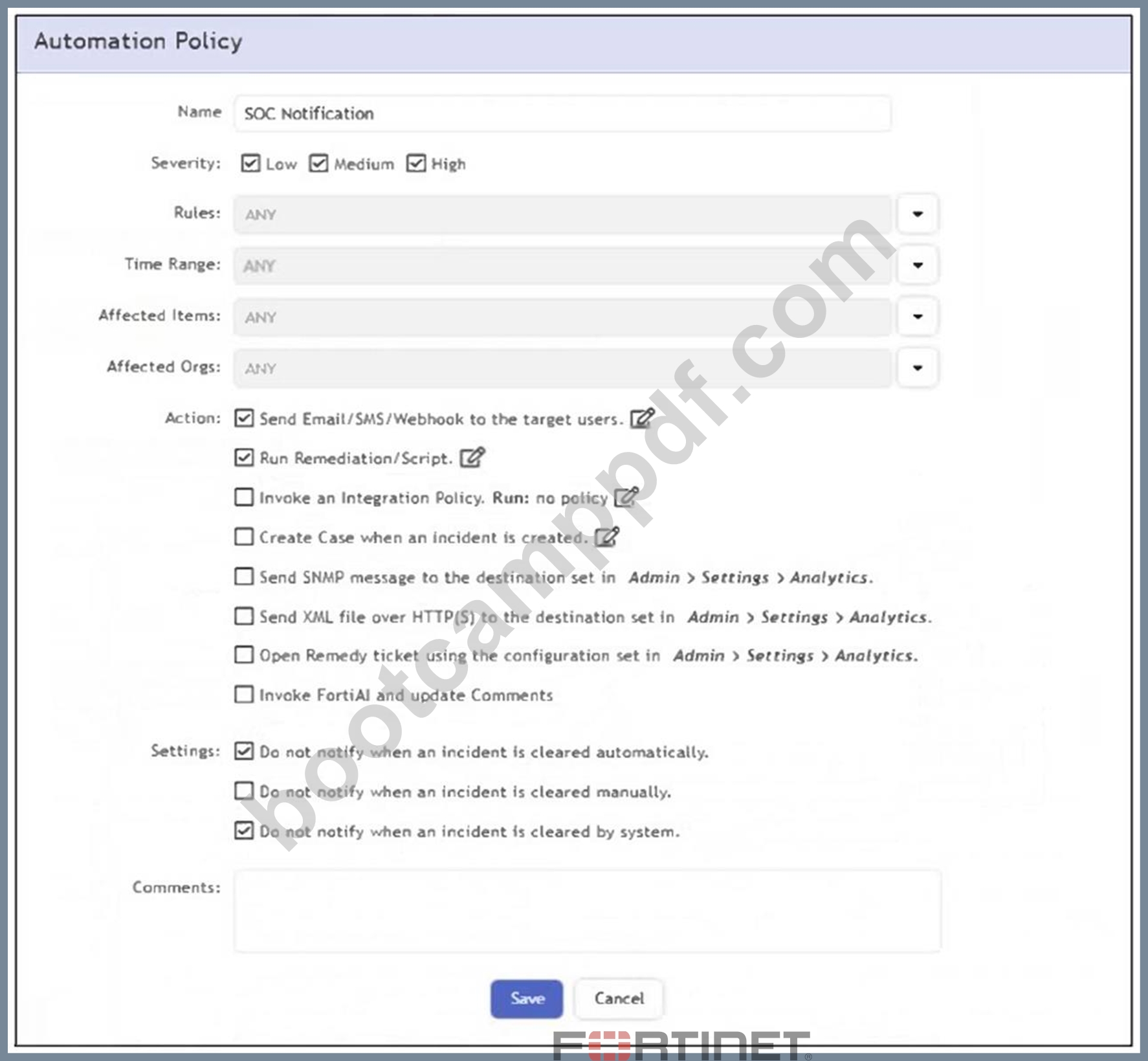
What happens when an analyst clears an incident generated by a rule containing the automation policy shown in the exhibit?
- A. The remediation script is run.
- B. No notification is sent.
- C. A notification is sent to the SOC manager dashboard.
- D. An email is sent to the SOC manager.
Answer: B
Explanation:
The automation policy has the option "Do not notify when an incident is cleared manually" enabled. Therefore, when an analyst manually clears an incident, no notification or automation action is triggered.
NEW QUESTION # 22
Refer to the exhibit.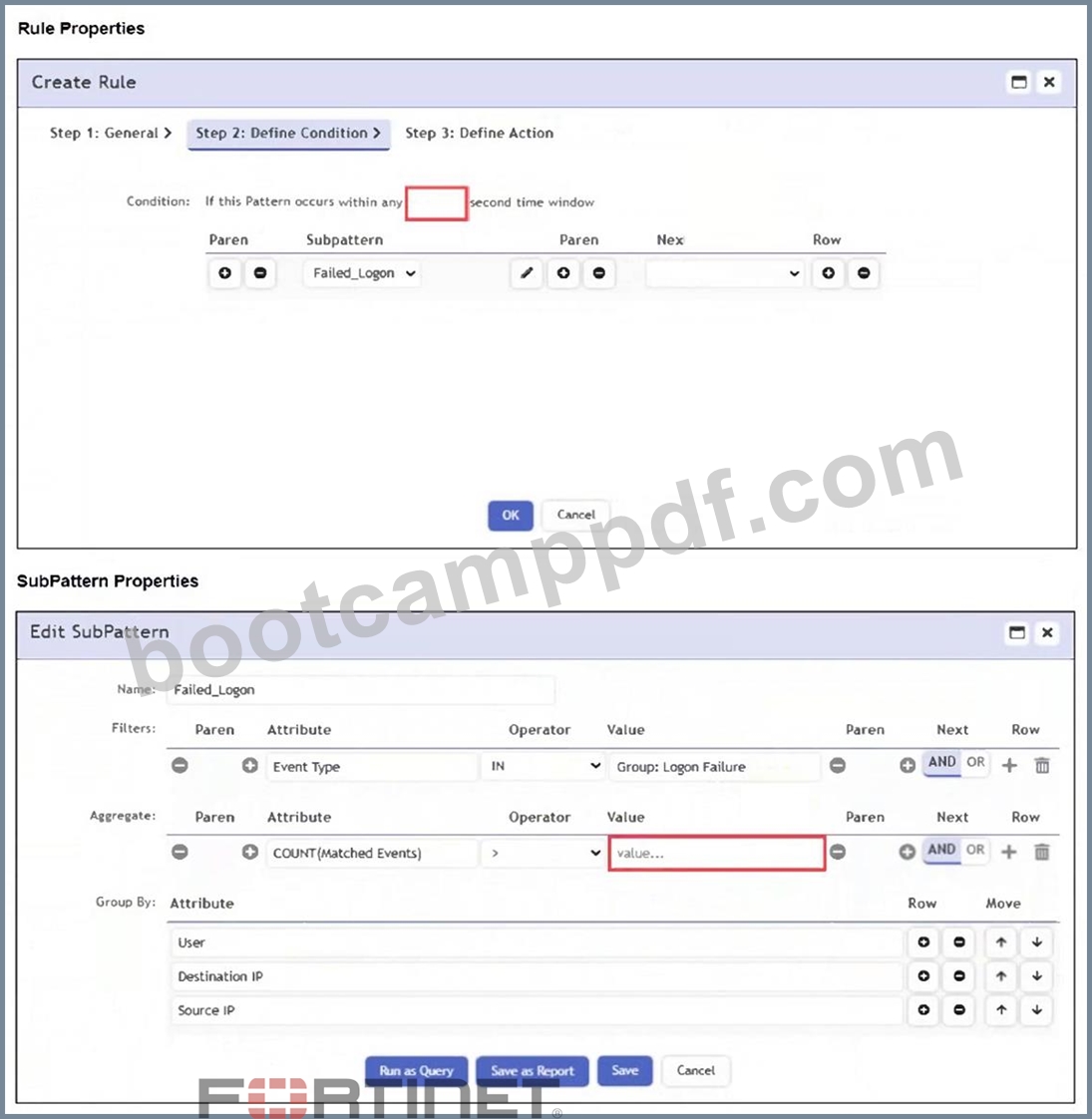
An analyst wants the rule shown in the exhibit to trigger when three failed login attempts occur within three minutes.
What should the values be for the condition time window and aggregate count?
- A. Time window 90 seconds, aggregate count 2
- B. Time window 180 seconds, aggregate count 3
- C. Time window 180 seconds, aggregate count 2
- D. Time window 90 seconds, aggregate count 3
Answer: B
Explanation:
To detect three failed login attempts within three minutes, you must set the aggregate count to 3 in the subpattern and the time window to 180 seconds in the rule condition. This ensures the rule triggers only if three or more failed logins occur in that timeframe.
NEW QUESTION # 23
Refer to the exhibit.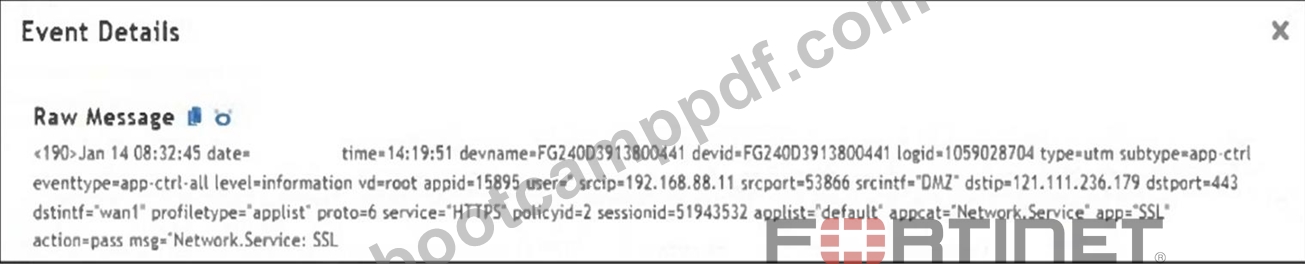
Which value would you expect the FortiSIEM parser to use to populate the Application Name field?
- A. applist
- B. wan1
- C. Network.Service
- D. SSL
Answer: D
Explanation:
The Application Name field in FortiSIEM is typically populated using the value of the app field in the raw log. In this event, app="SSL", so "SSL" is the expected application name parsed by FortiSIEM.
NEW QUESTION # 24
Refer to the exhibit.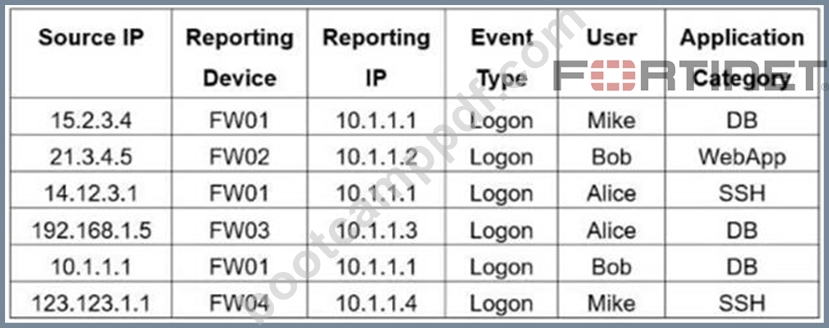
If you group the events by Reporting Device, Reporting IP, and Application Category, how many results will FortiSIEM display?
- A. Five
- B. Four
- C. Two
- D. One
- E. Six
Answer: A
Explanation:
Grouping by Reporting Device, Reporting IP, and Application Category yields five unique tuples: (FW01, 10.1.1.1, DB), (FW02, 10.1.1.2, WebApp), (FW01, 10.1.1.1, SSH), (FW03, 10.1.1.3, DB), and (FW04, 10.1.1.4, SSH).
NEW QUESTION # 25
What feature defines when an incident is created by FortiSIEM?
- A. CMDB
- B. Cases
- C. Rules
- D. Analytics
Answer: C
NEW QUESTION # 26
When configuring anomaly detection machine learning, in which step must you select the fields to analyze?
- A. Prepare Data
- B. Design
- C. Schedule
- D. Train
Answer: A
Explanation:
In the Prepare Data step of configuring anomaly detection in FortiSIEM, you must select the fields to analyze. This step defines the input features that the machine learning model will evaluate during training and detection.
NEW QUESTION # 27
Which statement about thresholds is true?
- A. FortiSIEM uses only global thresholds for performance metrics.
- B. FortiSIEM uses fixed, hardcoded global and device thresholds for all performance metrics.
- C. FortiSIEM uses global and per device thresholds for performance metrics.
- D. FortiSIEM uses only device thresholds for security metrics.
Answer: C
Explanation:
FortiSIEM evaluates performance metrics against both global thresholds, which apply system-wide, and per-device thresholds, which can be customized for individual devices. This dual approach allows flexibility in monitoring while ensuring consistent baseline alerting.
NEW QUESTION # 28
Refer to the exhibit.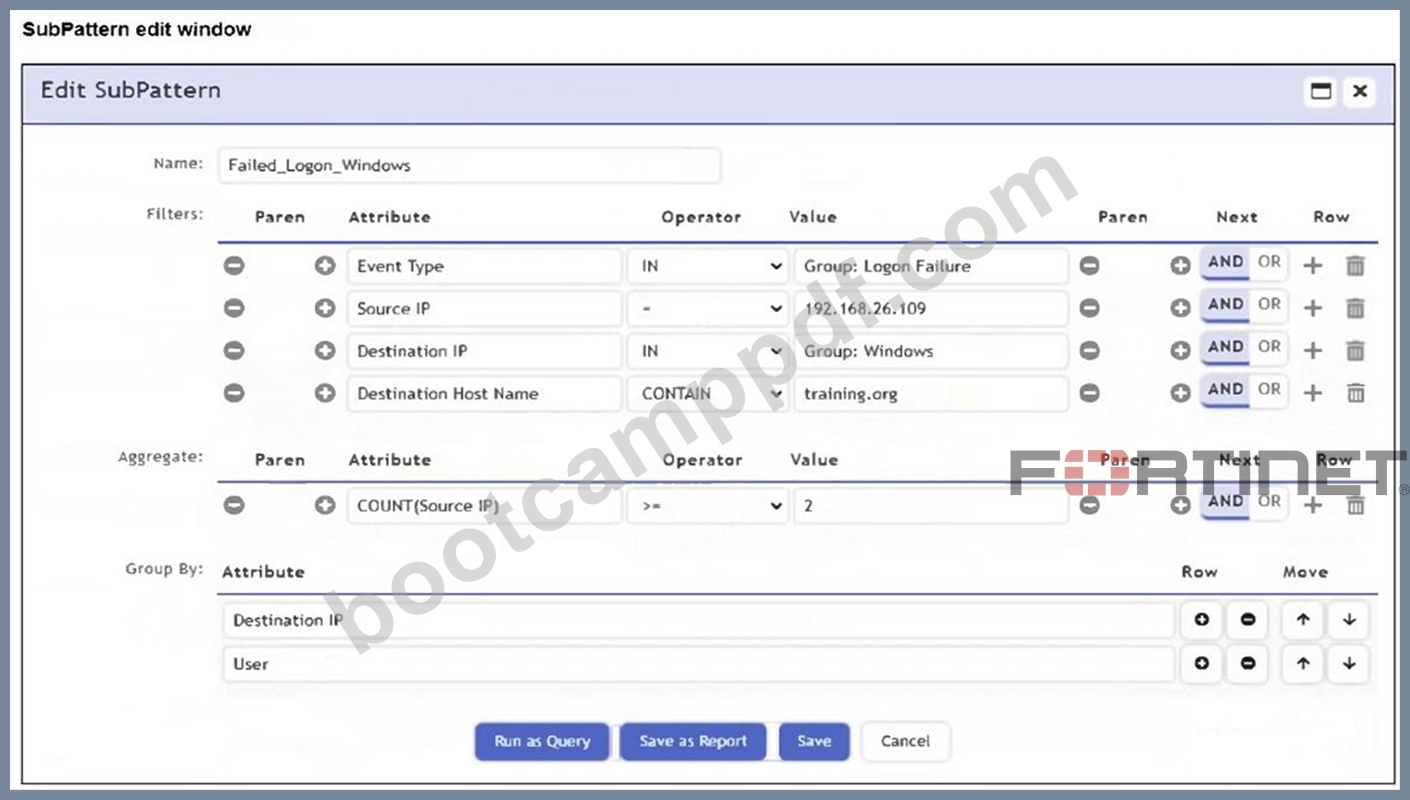
An analyst is troubleshooting the rule shown in the exhibit. It is not generating any incidents, but the filter parameters are generating events on the Analytics tab.
What is wrong with the rule conditions?
- A. The Event Type refers to a CMDB lookup and should be an Event lookup.
- B. The Destination Host Name value is not fully qualified.
- C. The Group By attributes restricts which events are counted.
- D. The Aggregate attribute is too restrictive.
Answer: C
Explanation:
The Group By attributes - Destination IP and User - cause the aggregation (COUNT(Source IP) >= 2) to apply within each unique combination of those groupings. This restricts the count calculation and can prevent the rule from triggering incidents, even if matching events exist in the Analytics tab.
NEW QUESTION # 29
Refer to the exhibit. If you group the events by Reporting Device, Reporting IP, and Application Category, how many results will FortiSIEM display?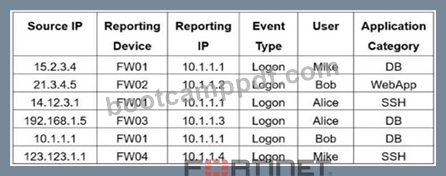
- A. Five
- B. Four
- C. Two
- D. One
- E. Six
Answer: A
Explanation:
Grouping by Reporting Device, Reporting IP, and Application Category yields five unique tuples:
(FW01, 10.1.1.1, DB), (FW02, 10.1.1.2, WebApp), (FW01, 10.1.1.1, SSH), (FW03, 10.1.1.3, DB), and (FW04, 10.1.1.4, SSH).
NEW QUESTION # 30
Which information can FortiSIEM retrieve from FortiClient EMS through an API connection?
- A. ZTNA tags
- B. Host software versions
- C. Host login credentials
- D. FortiSIEM license
Answer: A
Explanation:
FortiSIEM can retrieve ZTNA tags from FortiClient EMS through an API connection, enabling dynamic user and device classification for policy enforcement and incident response.
NEW QUESTION # 31
Refer to the exhibit.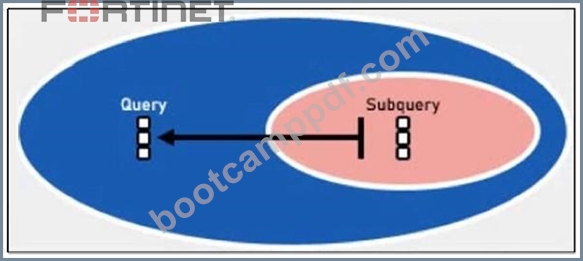
Which two lookup types can you reference as the subquery in a nested analytics query? (Choose two.)
- A. LDAP Query
- B. SNMP Query
- C. CMDB Query
- D. Event Query
Answer: B,D
Explanation:
In FortiSIEM nested analytics queries, you can reference both CMDB Queries and Event Queries as subqueries. These allow correlation between CMDB data and event data for advanced detection use cases.
NEW QUESTION # 32
Refer to the exhibit.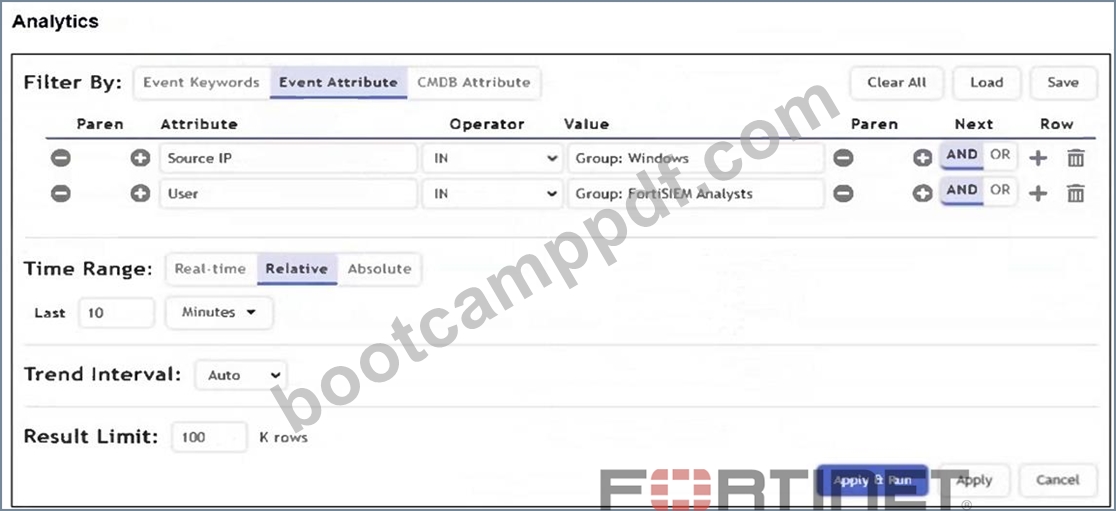
What is the Group: FortiSIEM Analysts value referring to?
- A. CMDB user group
- B. FortiSIEM organization group
- C. Windows Active Directory user group
- D. LDAP user group
Answer: A
Explanation:
In FortiSIEM, the value Group: FortiSIEM Analysts under the User attribute refers to a CMDB user group. These groups are defined within FortiSIEM's CMDB and used to logically organize users for analytics, correlation rules, and reporting.
NEW QUESTION # 33
Which information can FortiSIEM retrieve from FortiClient EMS through an API connection?
- A. ZTNA tags
- B. Host software versions
- C. Host login credentials
- D. FortiSIEM license
Answer: A
Explanation:
FortiSIEM can retrieve ZTNA tags from FortiClient EMS through an API connection, enabling dynamic user and device classification for policy enforcement and incident response.
NEW QUESTION # 34
What must you configure to apply ZTNA tags from FortiSIEM to devices in FortiClient EMS?
- A. Syslog connection to FortiSIEM from FortiGate firewalls
- B. API connection from FortiSIEM to FortiClient EMS
- C. API connection from FortiClient EMS to FortiSIEM
- D. Syslog connection to FortiGate firewalls from FortiSIEM
Answer: B
NEW QUESTION # 35
Refer to the exhibit.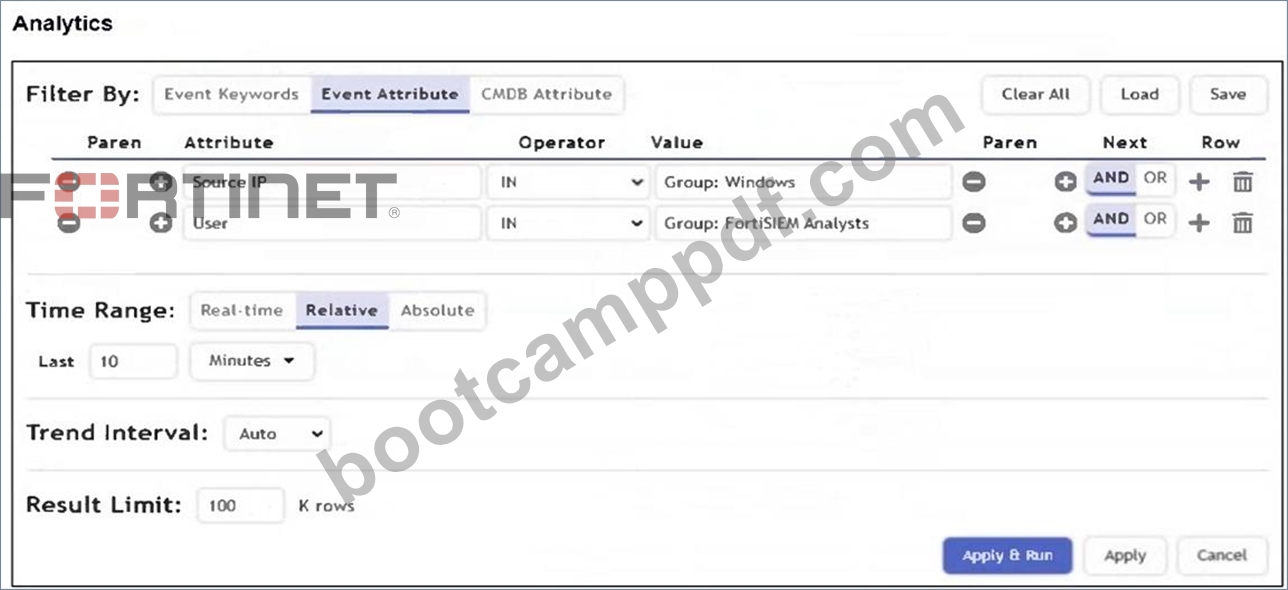
What is the Group: FortiSIEM Analysts value referring to?
- A. CMDB user group
- B. FortiSIEM organization group
- C. Windows Active Directory user group
- D. LDAP user group
Answer: A
Explanation:
In FortiSIEM, the value Group: FortiSIEM Analysts under the User attribute refers to a CMDB user group. These groups are defined within FortiSIEM's CMDB and used to logically organize users for analytics, correlation rules, and reporting.
NEW QUESTION # 36
Which analytics search can be used to apply a user and entity behavior analytics (UEBA) tag to an event for a failed login by the user JSmith?
- A. Username CONTAIN smit
- B. Username NOT END WITH jsmith
- C. User = smith
- D. User IS jsmith
Answer: D
Explanation:
The correct syntax to match an exact username in FortiSIEM analytics search is User IS jsmith. This ensures that the UEBA tag is applied only when the event is specifically tied to the user "jsmith", which is required for accurate behavioral analytics.
NEW QUESTION # 37
......
Fortinet FCP_FSM_AN-7.2 Exam Syllabus Topics:
| Topic | Details |
|---|---|
| Topic 1 |
|
| Topic 2 |
|
| Topic 3 |
|
| Topic 4 |
|
Get professional help from our FCP_FSM_AN-7.2 Dumps PDF: https://www.bootcamppdf.com/FCP_FSM_AN-7.2_exam-dumps.html
Give You Free Regular Updates on FCP_FSM_AN-7.2 Exam Questions: https://drive.google.com/open?id=1SeeITQaeYpj7gIMsUvcZKPvVMQrhGe5e